Signs and markings · about 8 min read
Direction commands and roundabouts
Blue signs that tell you where to pass, turn or circulate
What you will learn
- Tell “keep left” from “turn left”.
- Know which commands apply here and which apply at the next junction.
- Enter a roundabout in the right direction.
Direction commands and roundabouts: how to read them
Blue circles are command signs: they require an action rather than forbid one. Here the action is about direction. Some tell you to pass an obstruction on a given side, some restrict which way you may go at the junction you are at, and some prepare you for a required turn ahead.
Be precise about the arrow. A diagonal arrow points down past an obstruction. A horizontal arrow restricts your movement at this junction. An arrow that turns warns that the turn is at the next junction. Choose your lane early, because these commands are compulsory.
Key idea: Read the arrow shape, then decide whether it is about passing, going or turning ahead.
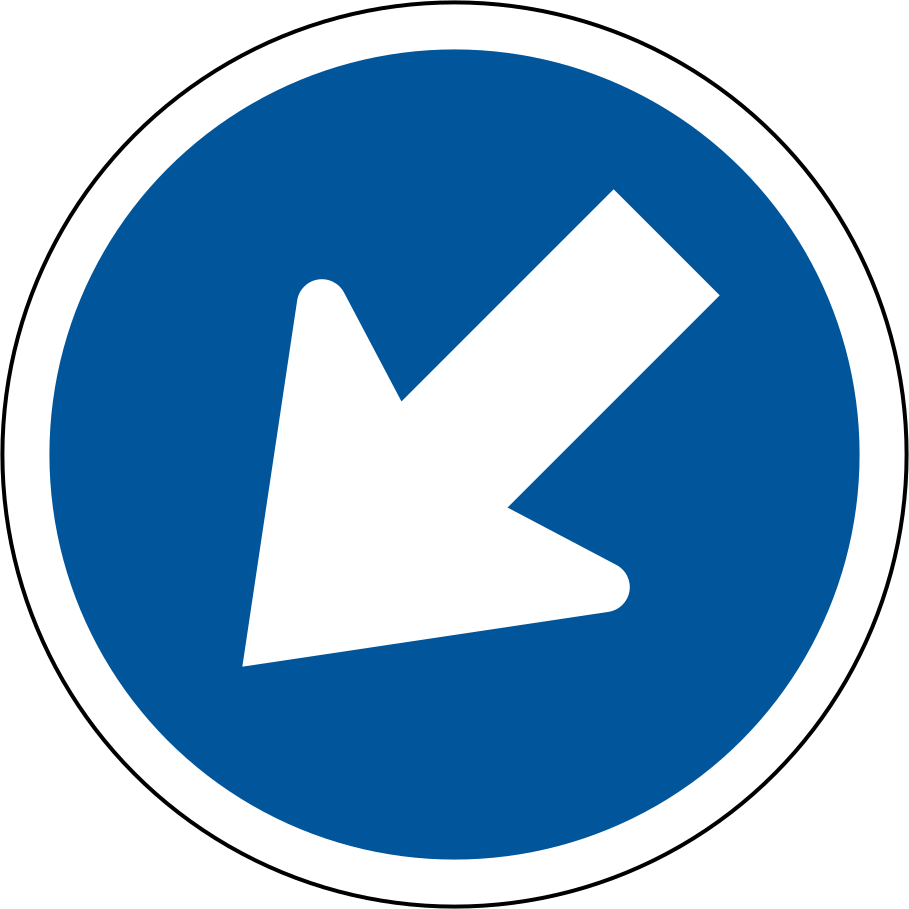
Keep left — R103
Pass to the left of the obstruction or traffic island.
Recognise it. A blue circle with a white arrow slanting down to the left.
Where you meet it. At obstructions such as traffic islands. Only one of R103 or R104 appears at a time.
What to do. Pass the obstruction on its left, following the arrow, and keep an eye on pedestrians and nearby traffic.
In practice. You see a traffic island in the middle of a street with this sign on it. You keep left of the island, hold your lane and watch for pedestrians stepping out beside it.
Easily confused. The diagonal arrow means “pass on this side”. A flat horizontal arrow (R105) means “turn left here”.
Key idea: Follow the arrow around the island. This is not a left-turn instruction.
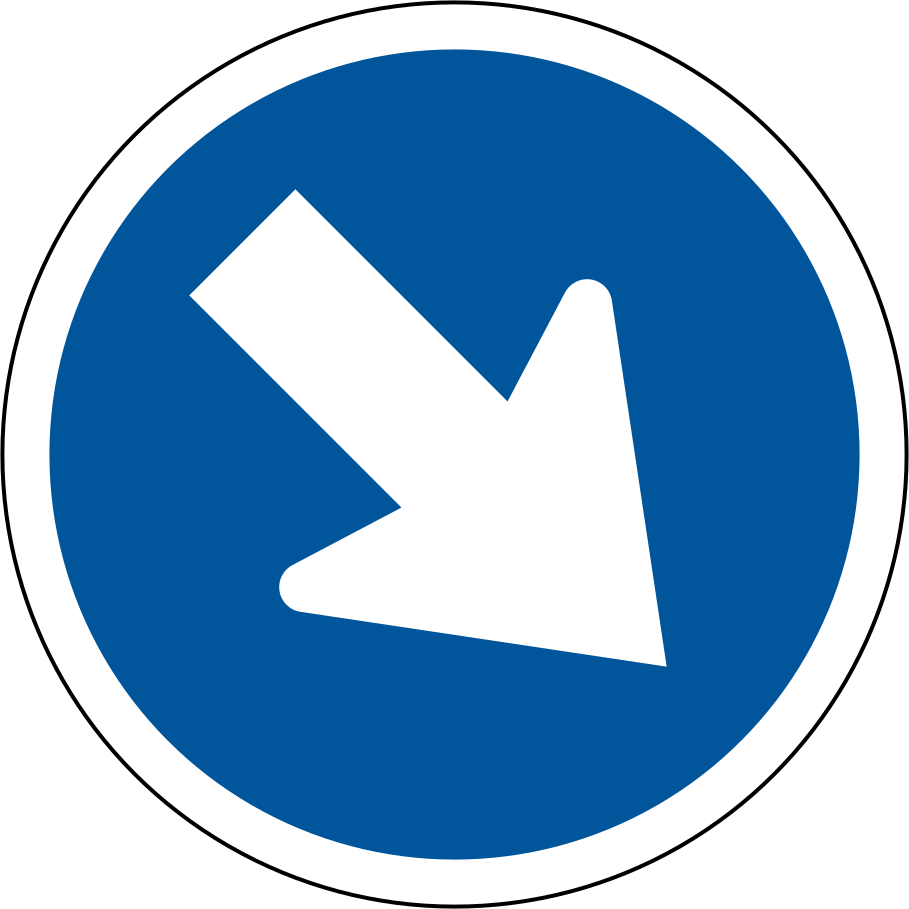
Keep right — R104
Pass to the right of the obstruction or traffic island.
Recognise it. A blue circle with a white arrow slanting down to the right.
Where you meet it. At obstructions such as traffic islands where traffic must pass on the right.
What to do. Pass on the right of the obstruction as shown, staying within your lane.
In practice. The sign on a median island points to the right. You pass on the right, check your mirror for vehicles in the lane beside you and keep a steady speed past the island.
Easily confused. It is the mirror image of R103. Do not read it as a right-turn instruction, and do not drive into opposing traffic to follow it.
Key idea: Follow the arrow while observing other traffic.
Turn left — R105
You must turn left at this point.
Recognise it. A blue circle with a white arrow pointing left. The manual groups it with the “proceed left only” signs.
Where you meet it. At intersections, where the movement you may make is being restricted.
What to do. Drive only in the direction shown. Get into the correct lane early, signal, and give way to pedestrians and any traffic with priority as you turn.
In practice. In the wrong lane for a left-only junction, you could be tempted to cut across. Instead you follow the arrow, turn left, then find a safe place to correct your route.
Easily confused. A compulsory direction tells you where you may go. It does not give you priority over a red signal or over pedestrians.
Key idea: Check, signal and turn left safely.
Turn right — R106
You must turn right at this point.
Recognise it. A blue circle with a white arrow pointing right, in the same group as “proceed right only”.
Where you meet it. At intersections where you may only go right.
What to do. Take the right-hand movement only, from the correct lane, with your signal on in good time and a check for oncoming traffic.
In practice. The right-only sign appears as you queue. You signal early, move to the right lane while there is still a gap and turn right only when oncoming traffic allows.
Easily confused. Do not treat it as a suggestion. If you are in the wrong lane, take a safe permitted movement and correct your route later.
Key idea: Check, signal and turn right safely.
Proceed straight — R107
Continue straight at this point.
Recognise it. A blue circle with a white arrow pointing straight up.
Where you meet it. At intersections where turning is not allowed and traffic must carry straight on.
What to do. Continue straight through the junction. Do not turn left or right, and obey any signal or stop control as well.
In practice. Your lane is straight-only at a busy intersection. You stay in it, ignore a driver hooting for you to turn and carry straight on when your light changes.
Easily confused. This restricts your options; it does not say you may go straight whenever you like. Lights and priority signs still apply.
Key idea: Do not turn left or right here.
Turn left ahead — R108
You must turn left at the junction ahead.
Recognise it. A blue circle with a white arrow that turns left, telling you what to do at the junction ahead.
Where you meet it. Shortly before an intersection, so you can prepare in advance.
What to do. Check your mirrors, move into the proper lane, slow down and signal. Make the left turn at the junction, not at the sign.
In practice. A sign ahead tells you to turn left at the next junction. You slow down, check your mirror and move into the left lane early so that you are in place before the intersection arrives.
Easily confused. R105 applies at the point you stand; this one is about the junction in front of you. Read the arrow and where you are.
Key idea: Position correctly and signal in good time.
Turn right ahead — R109
You must turn right at the junction ahead.
Recognise it. A blue circle with a white arrow that turns right, for the junction ahead.
Where you meet it. Ahead of an intersection, giving you time to position yourself.
What to do. Use the right-hand lane early, signal, check opposing traffic and pedestrians and turn at the junction when safe.
In practice. You are told to turn right at the junction ahead. You indicate in good time, choose the right lane and wait for a gap in oncoming traffic before turning at the junction itself.
Easily confused. Do not turn at the sign itself or cut across painted islands to reach the turn.
Key idea: Prepare to turn, checking mirrors and approaching traffic.
Roundabout — R137
Travel clockwise around the central island.
Recognise it. A blue circle containing three white arrows chasing each other clockwise.
Where you meet it. On roads where several roads meet around a central island.
What to do. Travel clockwise around the island. Give way to vehicles approaching from your right inside the roundabout when they are close enough to be a danger, and enter only when it is safe. Signal for your exit.
In practice. A roundabout sign appears at the entry. You slow, look right, give way to a car already in the circle and enter clockwise when it is safe, signalling left as you approach your exit.
Easily confused. The blue sign tells you the direction of travel. The yield or give-way control at the entry (for example R2.2 at a mini-circle) tells you who goes first.
Key idea: Observe the entry controls and give way as required.
Same blue circle, different job
R103 and R104 say which side of an island to pass. R105 to R107 limit you to one direction at this intersection. R108 and R109 describe the turn you must make at the next one. R137 tells you to circulate clockwise around a roundabout.
None of these overrides a signal or pedestrians. They tell you where you may go; the other controls tell you when.
Key idea: Read the arrow shape, then decide whether it is about passing, going or turning ahead.
Approaching a roundabout
A blue clockwise-arrow sign appears, with a yield line at the entry.
- Slow down and choose your entry lane early.
- Look right and give way to traffic already circulating.
- Enter when there is a safe gap and travel clockwise.
- Signal for your exit and check for pedestrians.
Quick recap
- Diagonal arrow: pass the obstruction on that side.
- Horizontal arrow: the movement you may make here.
- Curved arrow: the turn is at the next junction.
- Roundabouts run clockwise.
Practice questions on direction commands and roundabouts
1 What does this sign mean?
- Only motorcycles may use this route.
- Pass to the left of the obstruction or traffic island.
- Voluntary stopping is prohibited here.
Show the answer
Answer B: Pass to the left of the obstruction or traffic island.
Follow the arrow around the island. This is not a left-turn instruction.
Memory tip: R103 · Keep left
All vehicle codes
2 Which response fits this sign?
- Follow the arrow around the island. This is not a left-turn instruction.
- Use another route if you are driving a different vehicle.
- Do not stop to collect or drop off passengers. Obey traffic controls and emergencies.
Show the answer
Answer A: Follow the arrow around the island. This is not a left-turn instruction.
Keep left: Pass to the left of the obstruction or traffic island.
Memory tip: Follow the arrow around the island. This is not a left-turn instruction.
All vehicle codes
3 Which sign group does this example belong to?
- Prohibition
- Warning
- Command
Show the answer
Answer C: Command
Keep left is a command sign. Pass to the left of the obstruction or traffic island.
Memory tip: Follow the arrow around the island. This is not a left-turn instruction.
All vehicle codes
4 What does this sign mean?
- This route is restricted to motorcars.
- Pedestrians may not use this road.
- Pass to the right of the obstruction or traffic island.
Show the answer
Answer C: Pass to the right of the obstruction or traffic island.
Follow the arrow while observing other traffic.
Memory tip: R104 · Keep right
All vehicle codes
Part of the guide: Four-way stops and right of way, Traffic circles
More signs and markings chapters
- Stop controls
- Yield and priority signs
- No entry and one-way roads
- Who may use the road
- Speed signs
- Turn and U-turn prohibitions
Sources: NaTIS Road Traffic Signs, June 2012, PDF pp. 7, 10 (names, locations, purposes and actions); iDriving K53 manual, PDF pp. 6–42 (visual comparison; text extraction incomplete); SADC artwork: assets/signs/manifest.json (per-file sources and licences).
AceK53 is an independent study aid based on public road traffic manuals and is not an official test. Always confirm requirements with your driving licence testing centre.