Signs and markings · about 4 min read
Speed signs and mandatory directions
Read the colour, arrow and location together
What you will learn
- Distinguish maximum speed from minimum speed.
- Distinguish passing an obstruction from making a turn.
- Recognise at-point and ahead direction signs.
Maximum and minimum speed signs
The maximum-speed sign is a red-bordered circular sign with a number. The number is the maximum speed in kilometres per hour applying from the sign, subject to any lower vehicle-specific limit. It is not a recommended target. Reduce speed further when conditions require it.
The minimum-speed sign is blue and circular with a white number. It directs traffic to maintain at least the indicated speed on the applicable road where it can be done safely. Never accelerate into danger to satisfy it. If your vehicle cannot lawfully use a route under its controls, choose a permitted alternative.
Compare both the colour and the number. The blue example in this app displays 50, while the red example displays 60. A legacy internal illustration name is not the number printed on the sign.
Key idea: Red-bordered maximum and blue minimum have different meanings.
Keep left and keep right at an obstruction
Keep-left R103 and keep-right R104 are blue circular command signs with diagonal arrows. They are commonly mounted at a traffic island or other obstruction. The arrow tells you which side of that obstruction to pass.
Choose the required path early, check surrounding traffic and maintain clearance around the island. A keep-left arrow does not mean take a left turn into a side street. Likewise, keep-right does not authorise driving into the opposing side of a two-way road beyond the obstruction.
Use the actual arrow and road layout. The command is compulsory, but you must still make the movement without endangering pedestrians or other traffic.
Key idea: Keep left or right describes the side of an obstruction.
Proceed left, right or straight at this point
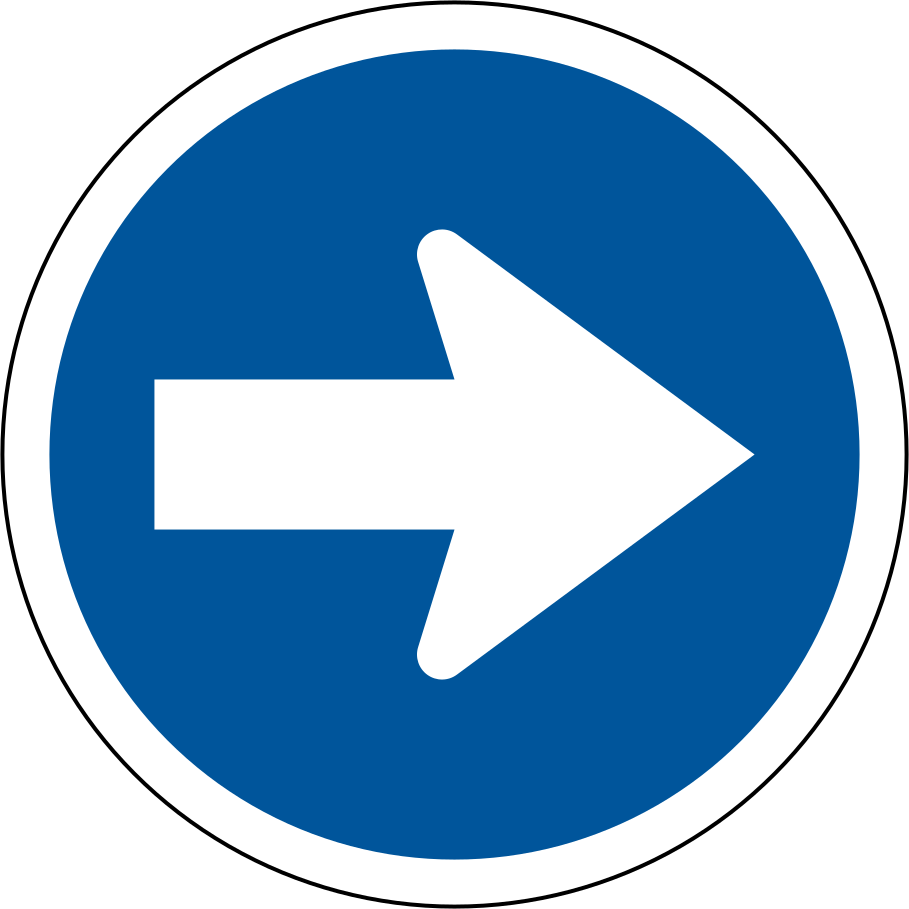
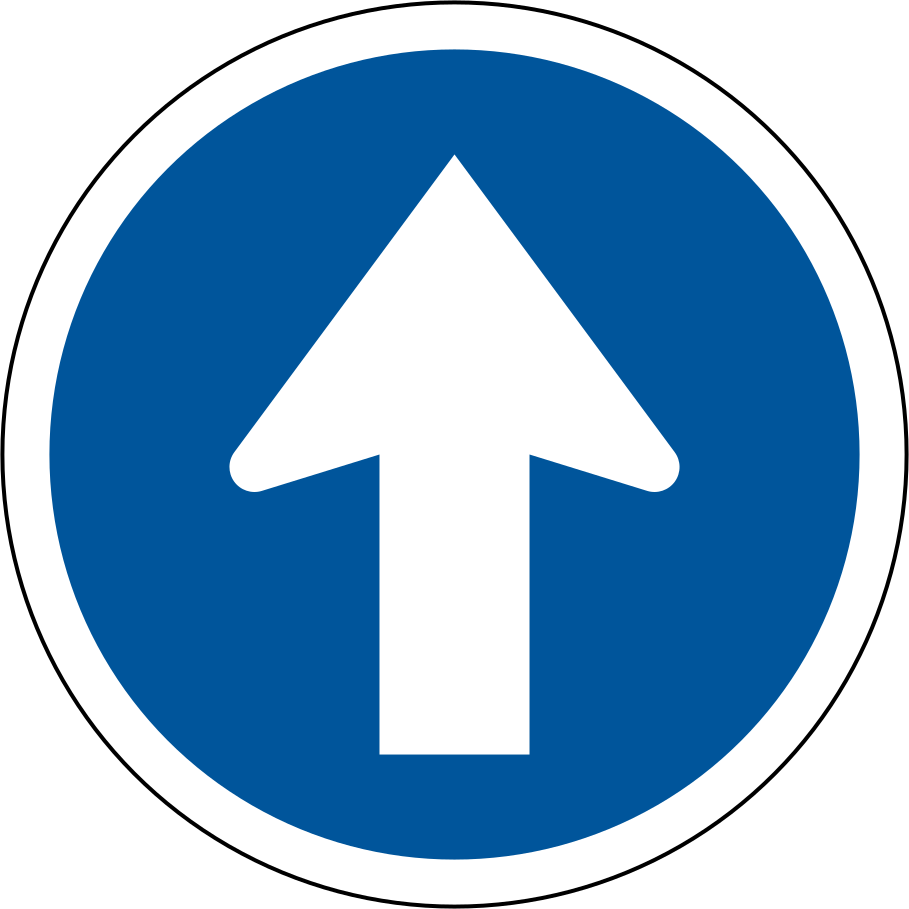
R105 and R106 use horizontal arrows to direct you left or right at the controlled point. R107 has an upward arrow directing you straight. These are command signs, not suggestions about a convenient route.
Read the direction in advance, select a permitted lane and signal when turning. Check pedestrians, cyclists, opposing traffic and any signal controlling the movement. A compulsory direction does not give you priority over a red light or another road user.
If you realise too late that you are in the wrong lane, do not make a sudden prohibited manoeuvre. Follow a safe permitted movement and correct the route later.
Key idea: A direction command tells you the required route, not who has priority.
Turn left or right at the junction ahead
R108 and R109 have arrows that turn through a bend and specify a turn at the junction ahead. They let you prepare before reaching the turning point. Compare them with the at-point arrows instead of assuming every left arrow controls the same location.
Check mirrors, identify the correct lane and indicate in good time. Adjust speed before the turn. At the junction, obey the stop, yield or light control and turn only when the intended path is clear.
The instruction remains about the signed movement and any supplementary conditions. It does not allow cutting across a painted island or ignoring lane markings to reach the turn.
Key idea: Prepare before the junction and follow the direction where it applies.
Other blue commands
Some blue circular commands specify a type of road user rather than a turn. Pedestrians-only and cyclists-only signs set aside a route for the indicated users. Motorcycles-only and motorcars-only signs likewise identify the permitted vehicle class. A motor driver must not enter a pedestrian or cycle route.
The pay-toll command means that using the indicated route requires payment; select a permitted alternative in good time if you do not want that route. The headlights-on command requires dipped headlights, often before a tunnel. The roundabout command requires clockwise circulation and must be read with the entry controls.
Blue does not mean “optional”. Read the symbol to identify the specific required action.
Key idea: Identify the symbol: blue commands cover directions, users and actions.
A keep-left sign before an island
A blue diagonal-left arrow is mounted on a traffic island, and a left side-road is nearby.
- Identify it as keep left of the island, not turn left into the side road.
- Check your available path and other road users.
- Pass the island on its left and continue along the permitted route.
Quick recap
- Maximum: do not exceed the number.
- Minimum: not a reason to drive into danger.
- Diagonal keep arrow: pass the obstruction on that side.
- Ahead-turn arrows apply at the junction ahead.
Practice questions on speed signs and mandatory directions
1 What does this sign mean?
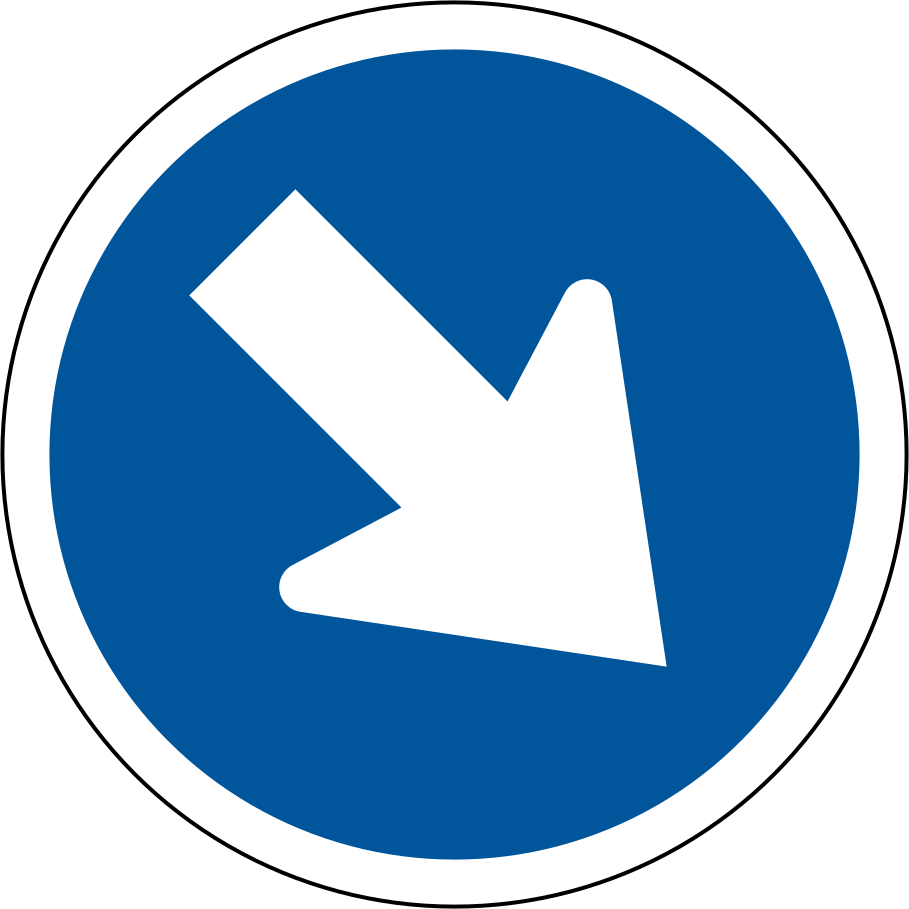
- This route is restricted to motorcars.
- Pedestrians may not use this road.
- Pass to the right of the obstruction or traffic island.
Show the answer
Answer C: Pass to the right of the obstruction or traffic island.
Follow the arrow while observing other traffic.
Memory tip: R104 · Keep right
All vehicle codes
2 What does this sign mean?
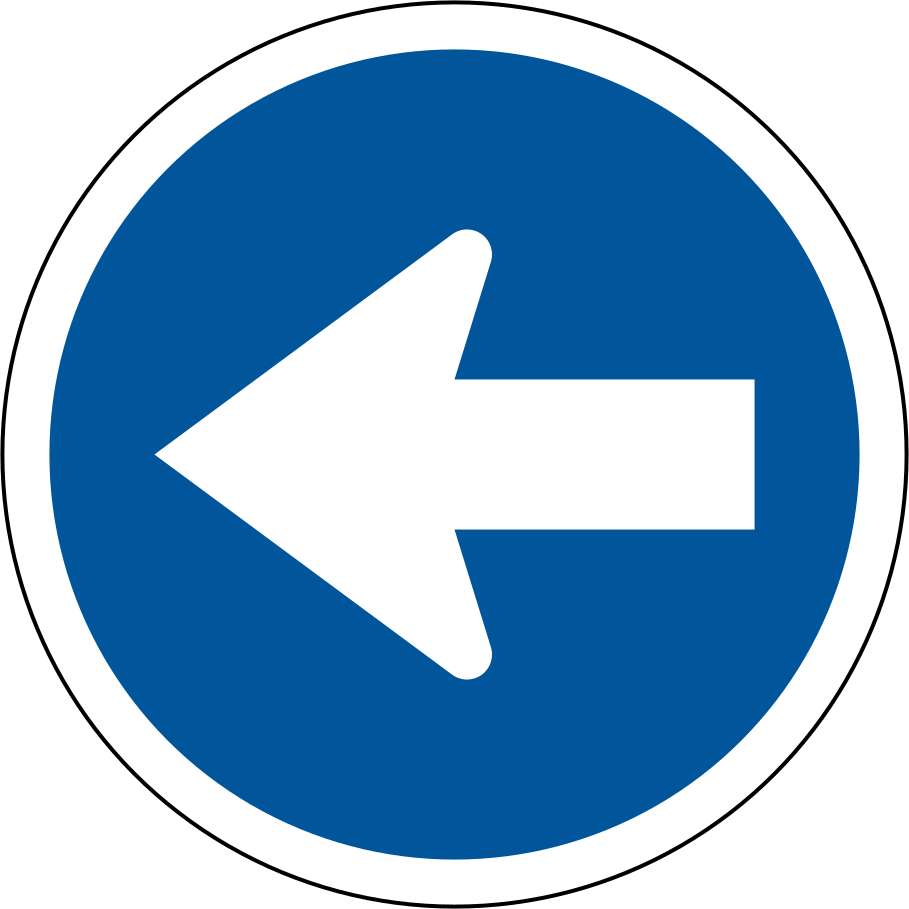
- You must turn left at this point.
- A toll payment is required on this road.
- Pedal cycles are prohibited on this road.
Show the answer
Answer A: You must turn left at this point.
Check, signal and turn left safely.
Memory tip: R105 · Turn left
All vehicle codes
3 What does this sign mean?
- This space is reserved for buses.
- You must turn right at this point.
- Headlights must be switched on.
Show the answer
Answer B: You must turn right at this point.
Check, signal and turn right safely.
Memory tip: R106 · Turn right
All vehicle codes
4 What does this sign mean?
- A dual-carriageway freeway begins here.
- Travel clockwise around the central island.
- Continue straight at this point.
Show the answer
Answer C: Continue straight at this point.
Do not turn left or right here.
Memory tip: R107 · Proceed straight
All vehicle codes
More signs and markings chapters
- Stop and yield signs
- Warning signs and temporary road controls
- Prohibition signs and restricted movements
- Signals, reservations and freeways
- Traffic lights and signal-controlled crossings
- Failed and flashing traffic signals
Sources: NaTIS Road Traffic Signs, PDF pp. 7, 11–12; iDriving K53 manual, PDF pp. 9–12.
AceK53 is an independent study aid based on public road traffic manuals and is not an official test. Always confirm requirements with your driving licence testing centre.